Libre Office Impress
LibreOffice Impress
Presentation : A presentation is a means of communication that can be adapted to various speaking situations, such as talking to a group, addressing a meeting or briefing a team. The presentation tells a story or supports speech or the presentation of information. We use for best presentation in meeting for best effect and result by the help or Presentation software.
Presentation Software : Presentation Software allows you to display information in the form of an electronic slide show. It is specifically designed to allow users to create a presentation of ideas. It helps in explaning the topic in text, images and audio/video. Example : Microsoft PowerPoint, LibreOffice Impress, Google Slide etc. Every presentation consists of a number of slides that describe a topic with text or graphics. Here a slide is a single page of a presentation.
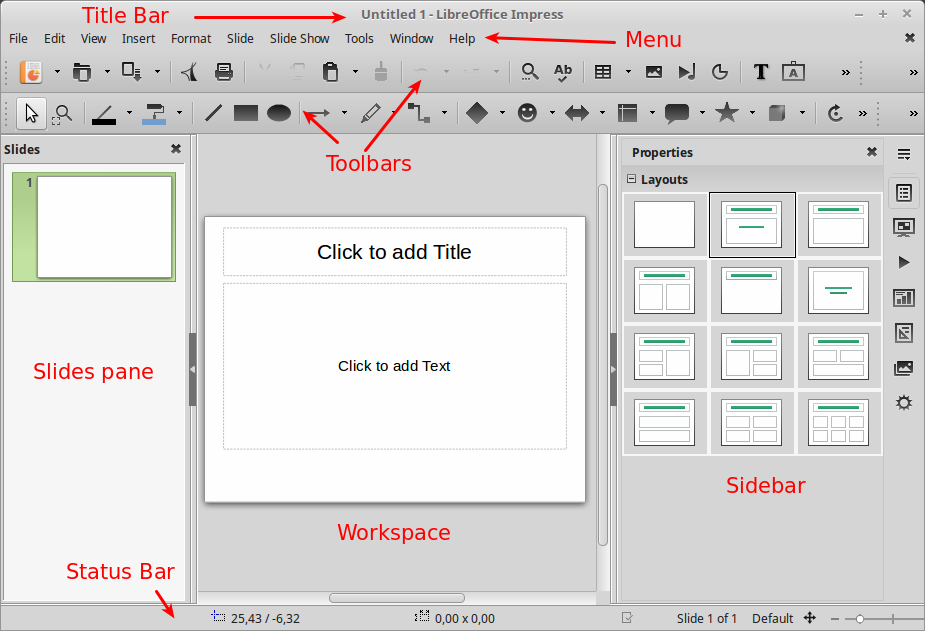
What is Impress? Impress is the presentation (slide show) program included in LibreOffice. You can create slides that contain many different elements, including text, bulleted and numbered lists, tables, charts, and a wide range of graphic objects such as clipart, drawings and photographs. The Impress main window has three essential parts: the Slides pane, Workspace, and Sidebar. Other parts of the LibreOffice Impress window include the Title Bar, Menu, Toolbars and Status Bar. These parts are similar to the LibreOffice Writer main window.
Slides pane : The Slides pane contains thumbnail pictures of the slides in your presentation, in the order the slides will be shown.
WorkSpace : It is the space for editing the particular slide to create the best presentation.The Workspace (normally in the center of the main window)bydefault opens in the Normal view. It has five tabs: Normal, Outline, Notes, Handout, and Slide Sorter. These five tabs are called View buttons.
Sidebar : The Sidebar is a vertical graphical user interface that primarily provides contextual properties of slide, style management (Layout style), document navigation, and media gallery features.
The Main Impress Window
The Impress main window has three parts: the Slides pane, Workspace, and Sidebar. Other parts of the Impress window include the Title Bar, Menu, Toolbars and Status Bar. These parts are similar to the Writer main window.


Comments
Post a Comment